

Services
Digital accessibility
WCAG 2.1 Level AA built into the platform — not a plugin bolted on top.
How it works
Here's what it looks like in practice
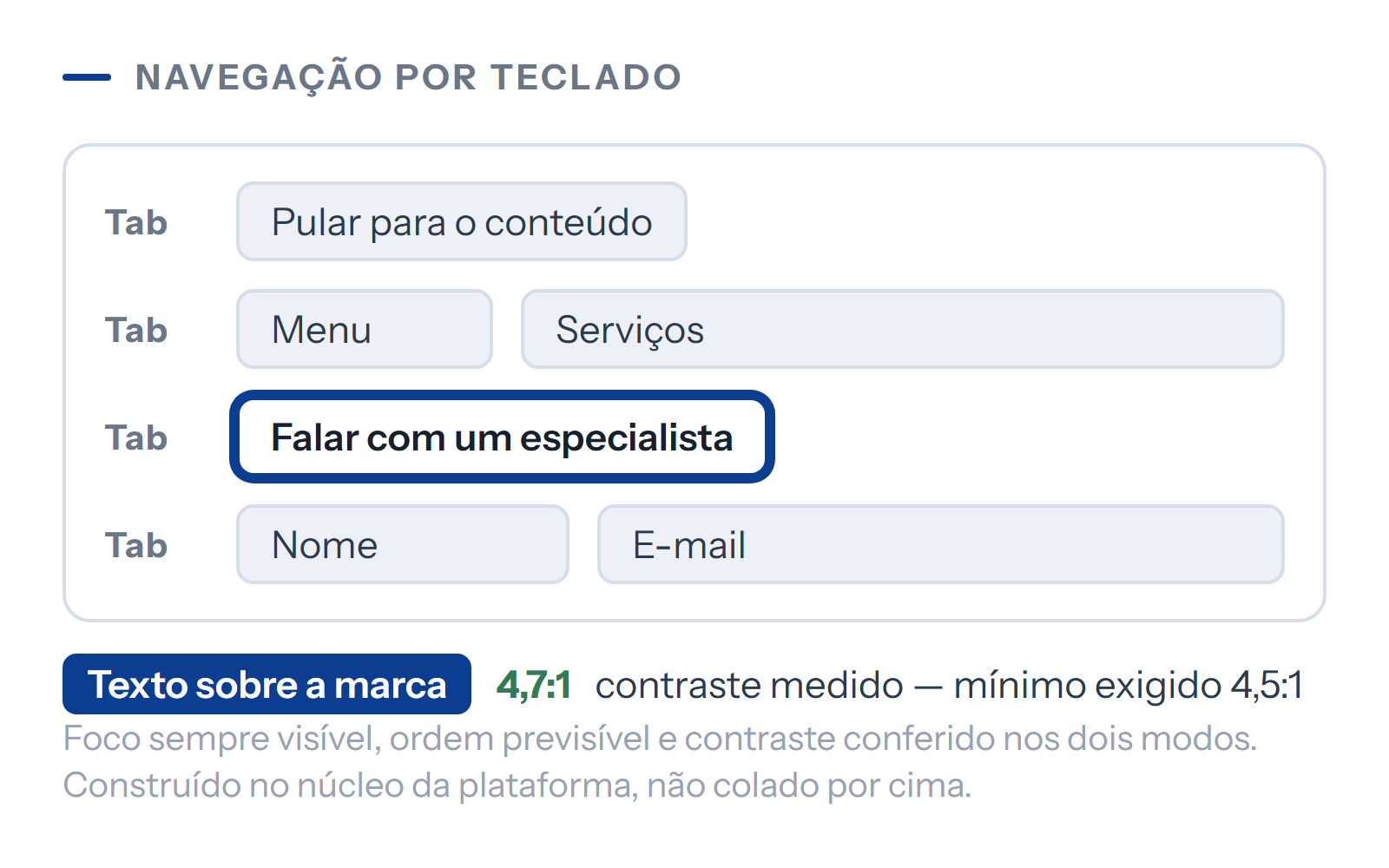
Accessibility isn't a contrast button stuck in a corner of the screen: it's the structure of the page. The OneRank platform is built from the start with full keyboard navigation, checked contrast, a label on every form field, and respect for the operating system's reduced motion setting. Every platform publishes its own accessibility statement — which any visitor can check, like the one in the footer of this page.
The problem
This is for you if…
Some of your customers simply can't use your platform
Full keyboard navigation, checked contrast and a structure screen readers can follow. People who rely on these features stop being shut out — an exclusion no one had even noticed.
Your company bids on public tenders and can't answer questions about accessibility
The platform publishes its own accessibility statement, showing the standard met and how it was verified. It stops being an unanswered question on the form.
Someone installed a contrast button and called it accessible
Here, accessibility is part of the page structure, not a floating menu stuck on top. What actually fixes the problem lives in the code: reading order, field labels, visible focus, real contrast.
Every new page brings the same problems back
The standard lives in the core of the platform instead of being applied screen by screen. A page you create tomorrow comes with correct contrast, focus and semantics from the start.
Honesty
This isn't for you if…
-
You want an accessibility seal or certificate
No authority issues WCAG certificates — the standard is technical, and you meet it through verifiable conformance, not a stamp. What we deliver is conformance built in, documented verification and a public statement. Anyone selling a seal is selling a sticker.
-
You want to fix accessibility with an overlay plugin
Those little floating contrast and font toolbars don't fix the page structure, the accessibility community itself advises against them, and some cost more per month than our entry-level monthly fee. We'd rather build it into the core and not charge for it.
-
You want to publish content without thinking about accessibility
The platform takes care of the structure, but part of it depends on whoever writes: describing images, not using color as the only cue, and writing link text that makes sense out of context. The admin panel warns you when something is missing, and ignoring the warning undermines the result.
-
You want Level AAA accessibility
Level AAA imposes restrictions that rule out much of the design of a business platform — and the guidelines themselves say AAA conformance is not expected for all content. Level AA is the benchmark used by the market and by legislation, and it's what we deliver.
Scope
What's included
Full keyboard navigation
People who don't use a mouse can use the entire platform
Technical detail
The whole platform can be operated without a mouse, in the right order, with focus always visible and no keyboard traps in menus or dialogs. It's the foundation that screen readers and people with motor impairments depend on.
Contrast checked on every screen
Text is readable for people with low vision
Technical detail
Text and interface elements are checked against the standard's minimum, in both light and dark mode. Contrast is the most common problem — and the easiest one to introduce without noticing.
Semantic structure and page landmarks
Screen readers navigate instead of reading everything
Technical detail
Headings in the correct hierarchy, named regions and a skip link that jumps straight to the content. That's what lets a screen reader move section by section instead of reading everything from the top.
Forms with proper labels and descriptive errors
A mistake in a field doesn't become a dead end
Technical detail
Every field has a properly associated label, and error messages say what to fix — announced so screen readers pick them up. Forms are where exclusion hurts most, because that's where business happens.
Respect for the reduced motion preference
Animations disappear for anyone who has asked their device for less motion
Technical detail
If someone has set their system to reduce animations, they get the platform without them. Motion they didn't ask for causes real discomfort for people with vestibular sensitivity, and the preference is already set on their device.
Alt text required in the admin panel
Images without a description don't go unnoticed
Technical detail
When you upload an image, the admin panel asks for a description — and flags it when it's missing. This is the part that depends on whoever publishes, and the system won't let it slip by silently.
Published accessibility statement
Your answer on accessibility is published
Technical detail
A dedicated page stating the standard met, how it was verified, what limitations remain and where to report a problem. Any visitor can check it — including a public agency.
Automated checks on every update
An update doesn't undo what was already right
Technical detail
Accessibility rules are part of the test suite that runs before anything goes live. Regressions in this area are silent by nature — which is why a machine checks for them, not someone's memory.
Testing with a real screen reader
Someone went through the platform the way your customers do
Technical detail
Beyond automated checks, the main user flows are walked through with an actual screen reader. Automated tools catch some of the problems; the rest only shows up in real use.
Specifications
Technical specs
- Standard met
- WCAG 2.1 AA WCAG 2.1, Levels A and AA — the benchmark used by the market and by Brazilian law.
- Where conformance lives
- In the core In the core of the platform. It applies to every page, including the ones you create later — it isn't applied screen by screen.
- Which plans
- All plans All of them. Accessibility isn't a higher-tier feature, any more than security and backups are.
- Verification
- Automated and manual Automated on every update, plus manual screen reader testing of the main user flows.
- Third-party overlays
- Not used We don't use them. Conformance is built into the code; overlays don't fix structure, and the community advises against them.
- Public statement
- Live A dedicated page with the standard, verification method, known limitations and a contact channel.
- Light and dark mode
- Both checked Contrast is checked in both modes, not just in the default theme.
From sign-up to launch
How we deliver
-
Color palette checked for contrast
you approve the adjustmentYour brand colors are checked against the standard's minimum before they go into the platform. When a shade doesn't pass, we adjust how it's applied instead of bending the rule.
-
Page structure built
nothing needed from youHeading hierarchy, named regions, focus order and a skip link to the content — decided when the theme is applied, not patched afterward.
-
Forms and components reviewed
nothing needed from youA label on every field, errors described and announced, and dialogs and menus operable by keyboard without trapping focus.
-
Screen reader testing
nothing needed from youThe main flows actually walked through — home page, contact, service, blog post — with a real screen reader, not just an automated checker.
-
Statement published
you approve the textThe accessibility page goes live, with the standard, method, known limitations and a channel to report problems.
-
Checks on every update
nothing needed from youThe rules go into the automated test suite, so a change that breaks accessibility never goes live.
How to get it
Included from the Presença plan up
-
Starts here
Presença
R$ 249/month
includes this serviceFull conformance, starting with the entry-level plan
WCAG 2.1 Level AA built into the core of the platform, checked on every update and publicly declared. It isn't a higher-tier feature, and it isn't billed separately.
-
Destaque
R$ 799/month
includes this serviceThe same conformance
Identical to Presença. Accessibility is platform infrastructure, like security and backups — it would make no sense to sell a watered-down version of it on the entry-level plan.
-
Autoridade
R$ 1,499/month
includes this serviceThe same conformance, plus periodic audits
It delivers exactly what the other plans do. What Autoridade adds is the quarterly audit, in which accessibility is reviewed alongside SEO and presence in AI answers.
Accessibility is included in every plan and never billed separately — we built it into the platform's core so we don't need to charge for it per client.
What's ready
In the first month, you already have
The accessibility statement, live
Published and linked in the footer, stating the standard met and how it was verified. Just like the one in the footer of this page.
The entire platform navigable by keyboard
You can check it yourself: browse the platform using only the Tab key and watch the focus stay visible the whole time.
Your palette's contrast, verified
In both modes, with the application adjustments already made wherever a shade didn't pass.
Screen reader testing, documented
The main flows walked through and the findings fixed before launch — not added to a list for later.
Checks running on every update
The rules built into the test suite, blocking any release that would break what was already right.
Before you sign up
Frequently asked questions
No, not on any plan. It's included in the Presença plan, at R$ 249 a month, and it's identical across all three tiers. We built it into the core of the platform precisely so we wouldn't have to charge per client: it costs the same to maintain for one platform as for a hundred.
No. Those overlay plugins don't fix the page structure, the accessibility community advises against them, and their professional versions cost more per month than our entry-level monthly fee. We'd rather solve it in the code and deliver it at no extra cost.
No authority certifies WCAG — anyone offering a seal is selling a sticker. What you get is the accessibility statement published on the platform, stating the standard met, how it was verified and which limitations are known. That's the document public agencies and tender notices ask for.
For public agencies and those who do business with them, yes, and the reference standard is the same one we meet. For private companies, the requirement varies by case and industry — but the Brazilian Inclusion Law treats digital accessibility as a right, and the discussion has been moving firmly in that direction. Either way, it concerns a real share of your audience.
Describe your images, write links that make sense when read out of context, and don't use color as the only way to convey something. The admin panel asks for an image description and flags it when it's missing. Structure, contrast and keyboard access are the platform's responsibility — content is the part that depends on whoever writes it.
Yes. Conformance lives in the core of the platform instead of being applied page by page — headings, focus, contrast and semantics come ready in any new content. What stays in your hands is describing images and writing meaningful link text.
Two ways: an automated test suite that runs before every release and blocks anything that fails, and manual testing of the main flows with a screen reader. Automated tools catch a good share of the problems, but not all of them — the rest only shows up when a person actually uses the platform.
We also do
Other areas of our work
Online presence on our own platform
Your business online, easy to find, and well maintained — on the OneRank platform, not a generic website builder.
SEO and presence in AI answers (GEO)
Traditional rankings on Google and presence in the answers AI tools give.
Content and publishing
A blog, FAQs, and pages that grow on their own — with content production included from the Destaque plan up.
Next step
Is it right for your business?
We look at your situation and tell you whether this is the right place to start — or which one would be.
Prices published on the platform, no "contact us for pricing".