

Services
Professional email on your domain
Standalone add-on: accounts on your domain, set up, migrated, and kept under watch — so your email gets delivered and stays out of spam.
How it works
Here's what it looks like in practice
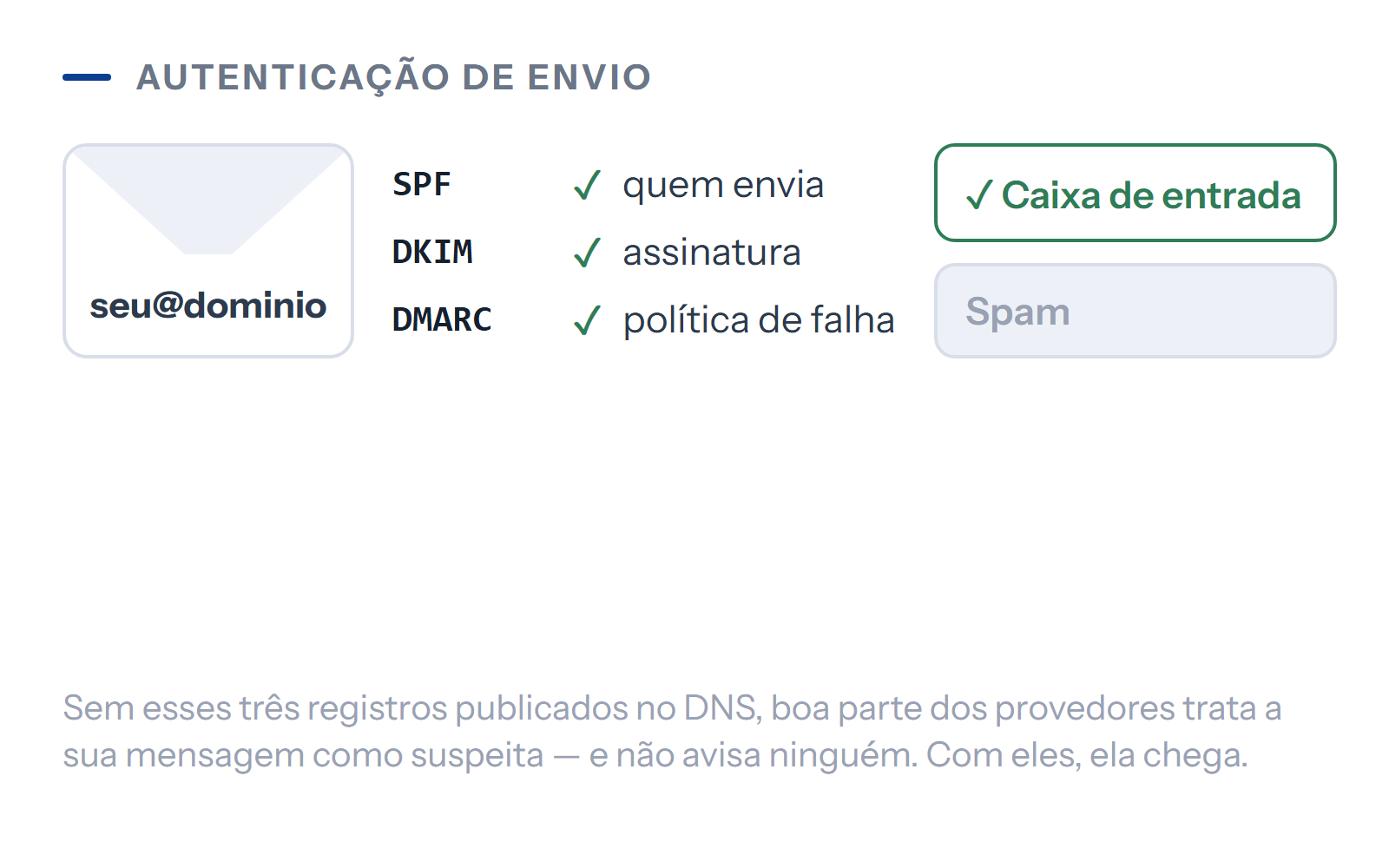
Writing from an address on your own domain, rather than a free email account, is what sets a business apart from a makeshift contact. OneRank creates the accounts, moves over your existing messages and contacts, publishes the DNS records that prove the email really is yours (SPF, DKIM, and DMARC), and keeps an eye on delivery. Accounts are already included in every plan — this add-on is for those who want email only, without a plan, or accounts beyond the ones included.
The emails the platform sends on its own — form replies, newsletter confirmations, system notices — don't depend on your mailbox: they go out through the platform's infrastructure, with a backup route if the main provider fails. Your account is for you to send and receive; automated delivery is our job.
The problem
This is for you if…
Your company does business from a free email account in the owner's name
Your company starts writing from an address on its own domain. Accounts are already included in every plan; the standalone add-on is for those who want email only, without a plan, or who need accounts beyond the ones included.
The emails your company sends land in recipients' spam folders
The records that prove an email really comes from you are published in DNS. Without them, many providers treat your message as suspicious — and nobody tells you.
Switching email would mean losing years of history
Messages and contacts from your current mailboxes are moved to the new ones. Your history stays accessible at the new address.
When someone leaves the company, their mailbox leaves with them
Accounts live on the company's domain. The company manages them, and the address keeps working with someone else behind it.
Honesty
This isn't for you if…
-
You want a full office suite, with documents and video calls
This is business email: mailboxes on your domain, with webmail and mobile access. Document editing, shared spreadsheets, video conferencing, and cloud storage are a different product category, and there are good options on the market at prices it wouldn't make sense to bundle in here.
-
You want to send mass campaigns from your mailboxes
A business mailbox is for conversations, not blasts. Mass sending from it burns your domain's reputation and drags down the company's everyday email too. Campaigns go out through the platform's newsletter infrastructure, which exists precisely for that.
-
You expect unlimited storage
Every mailbox has a set amount of space, and space costs money. Attaching large files and never deleting anything is the fastest way to fill a mailbox until it stops receiving mail. The contracted size is put in writing, and guidance on keeping things organized is part of the setup.
-
You want us to answer the emails you receive
We hand over the mailbox up and running, migrated, authenticated, and watched over. Reading and replying is up to your team — not least because email conversations usually involve prices, deadlines, and commitments that only the people running the business can take on.
Scope
What's included
Accounts on your domain
You write from an address that belongs to the company
Technical detail
Addresses on your company's domain, created and configured. Three are already included in the Presença plan; the add-on covers those who want email only or need mailboxes beyond those.
Migration of your current mailboxes
Your history comes along; nothing gets left behind
Technical detail
Messages, folders, and contacts moved from your previous provider to the new one, keeping the organization you already had.
Authentication published in DNS
Your email stops looking suspicious to recipients
Technical detail
The three records that prove to the world that an email really came from your domain, published and verified. It's the difference between landing in the inbox and landing in the spam folder.
Anti-spam and antivirus
Less junk and fewer scams reaching your mailbox
Technical detail
Filtering of incoming mail, with a quarantine you can review. A business mailbox without filtering becomes the easiest channel for attacks on your company.
Webmail and mobile access
Your email opens in the browser and on your phone
Technical detail
Browser access from anywhere, plus setup in the email app on your computer and phone — done by us, not left as a task for you.
Deliverability tracking
You catch a delivery problem before your customers do
Technical detail
Watching for signs that providers are treating your domain well, with fixes when something slips. Delivery problems are silent by nature.
Managed by the company
The mailbox belongs to the company, not to whoever uses it today
Technical detail
Creating and removing accounts and resetting passwords are company operations, not one person's. When someone leaves, the address stays with the people who remain.
Platform emails on a separate path
The platform keeps sending even if your mailbox has a problem
Technical detail
Form responses, newsletter confirmations, and system notices go out through the platform's infrastructure, with a backup route if the main provider fails — they don't depend on your mailbox.
Specifications
Technical specs
- Accounts included in your plan
- 5 on every plan Accounts on your domain are already included in every plan, with setup support.
- When the add-on makes sense
- Standalone For those who want email only, without a plan, or who need mailboxes beyond the three already included.
- Price
- By proposal Not published yet. It depends on the number of mailboxes and the storage space, and it's set out in writing in the proposal.
- Sending authentication
- Published in DNS The three authentication records, published and verified in your domain's DNS.
- Migration
- Included Messages, folders, and contacts from your previous provider, with their organization preserved.
- Access
- Browser and app Webmail in the browser, plus setup in the app on your computer and phone.
- Mass sending
- Via the newsletter That's not what it's for. Campaigns go out through the platform's newsletter infrastructure, which protects your domain's reputation.
- Automated platform emails
- Separate path They go out through the platform's own infrastructure, with a backup route. They don't depend on your mailbox.
From sign-up to launch
How we deliver
-
Addresses defined
you decide the addressesWhich accounts the company needs and who uses each one. It's the conversation that keeps you from creating eight mailboxes for a team of three.
-
Accounts created
no action needed from youThe mailboxes on your domain, with a set amount of space and passwords delivered securely — never in an unprotected message.
-
Authentication published in DNS
needs access to your DNSThe records that prove where your messages come from, published and verified. This step requires access to the domain.
-
Message migration
needs access to your current mailboxesThe contents of the old mailboxes are moved before the switchover, so nobody is left without their history on switchover day.
-
Device setup
half an hour of each person's timeEach person's computer and phone set up and tested with real sending and receiving.
-
Switchover and follow-up
no action needed from youThe domain starts receiving mail through the new provider, and delivery is tracked over the following weeks.
How to get it
Sold separately
It's purchased separately, on any plan — including the entry-level plan. If you don't want it, you don't pay for it. R$ 2.50 per account/month + R$ 2.00/GB/month
Five email accounts are already included in every plan. The standalone price is for those who want email only, without a plan, or for accounts beyond those five: a per-account management fee plus the storage you contract. If you already use another provider, we charge only for management.
What's ready
In the first month, you already have
The accounts, created and tested
Every mailbox with sending and receiving actually checked, not just created in the control panel.
Authentication published and verified
The three DNS records checked with an external tool — you can verify them yourself later.
Your history, migrated
Messages, folders, and contacts from the old mailboxes accessible in the new ones, with their organization preserved.
Everyone's devices set up
Computer and phone working, tested in front of the person who will use them.
Administration in the company's hands
Whoever is responsible for the company gets access to create and remove accounts and reset their passwords.
Before you sign up
Frequently asked questions
Probably not. Accounts on your domain are already included in every plan, with setup support. This standalone price exists for two cases: people who want email only, without signing up for a plan, and people who need accounts beyond the ones included.
The price hasn't been published yet, and we'd rather say so than make up a number. It depends on the number of mailboxes and the space for each one, and it's set out in writing in the proposal. On a platform whose promise is published pricing with no "contact us for a quote," leaving it blank is more honest than guessing.
No. Messages, folders, and contacts are migrated before the switchover, with their organization preserved — nobody is left without their history on switchover day. It's the step that worries people most when they change providers, and that's exactly why it happens before, not after.
Almost always because your DNS is missing the records that prove the message really came from your domain. Without them, providers treat what you send as suspicious — and they don't tell anyone. Publishing and verifying those records is part of the setup here.
No. This is email: mailboxes on your domain, with webmail and mobile access. Shared documents, spreadsheets, video calls, and cloud storage are a different product category — and it wouldn't make sense to build them into the price of an email service.
That's not the way to do it. Mass sending from a business mailbox burns your domain's reputation and ends up dragging down even your everyday email. Campaigns go out through the platform's newsletter infrastructure, which has double opt-in for sign-ups and handles unsubscribes — built precisely for that.
No. Form responses, newsletter confirmations, and system notices go out through the platform's own infrastructure, with a backup route if the main provider fails. Your mailbox is for you to write and receive; the platform's automated delivery is our job.
We also do
Other areas of our work
Online presence on our own platform
Your business online, easy to find, and well maintained — on the OneRank platform, not a generic website builder.
SEO and presence in AI answers (GEO)
Traditional rankings on Google and presence in the answers AI tools give.
Content and publishing
A blog, FAQs, and pages that grow on their own — with content production included from the Destaque plan up.
Next step
Is it right for your business?
We look at your situation and tell you whether this is the right place to start — or which one would be.
Prices published on the platform, no "contact us for pricing".